Storing Data using Resource Collections
Ignition 8.3 provides a completely overhauled configuration data storage mechanism. 8.3.0's new config system borrows from the project system that was originally rewritten in 8.0 and has stayed basically the same since. Essentially, configuration data is stored in a number of "resource collections" which are automatically loaded in a predefined inheritance order upon system startup. This presents a single, flat configuration view to end users and consumers of the system.
The images below show this configuration and how it will differ when it comes to active deployment modes. The details of how to override this system (e.g. "deployment modes") are usually irrelevant to module authors and SDK users, but the Deployment Modes page in the Ignition User Manual contains more information.
Dev Deployment Mode 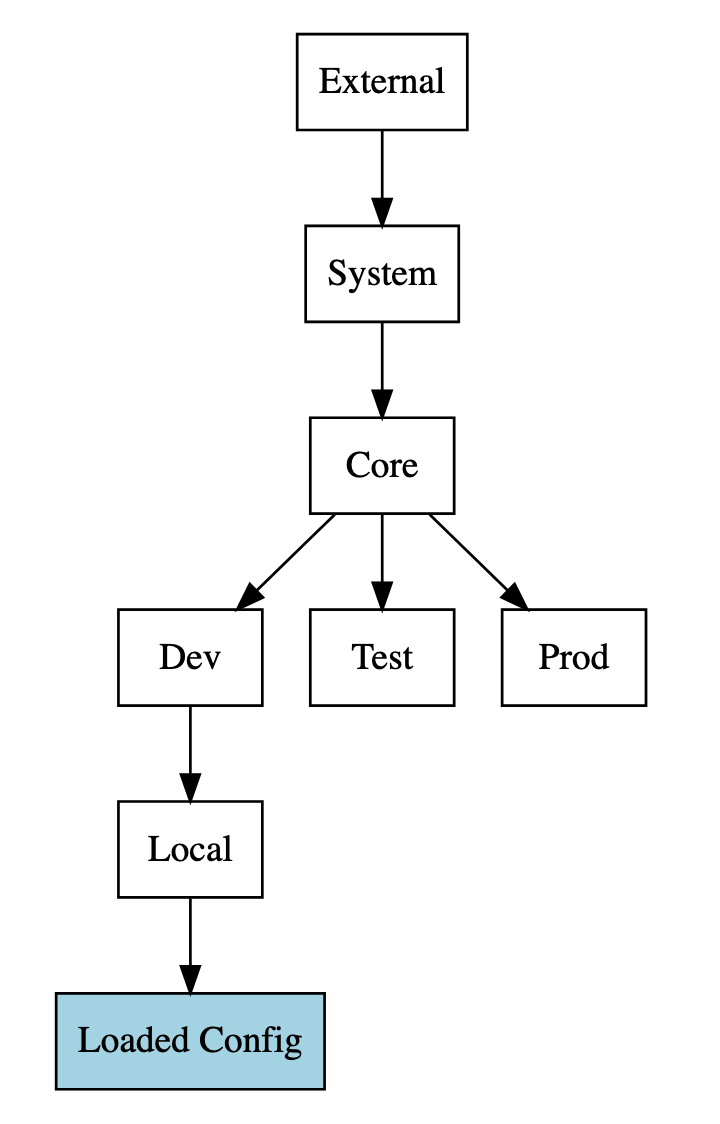 | Test Deployment Mode 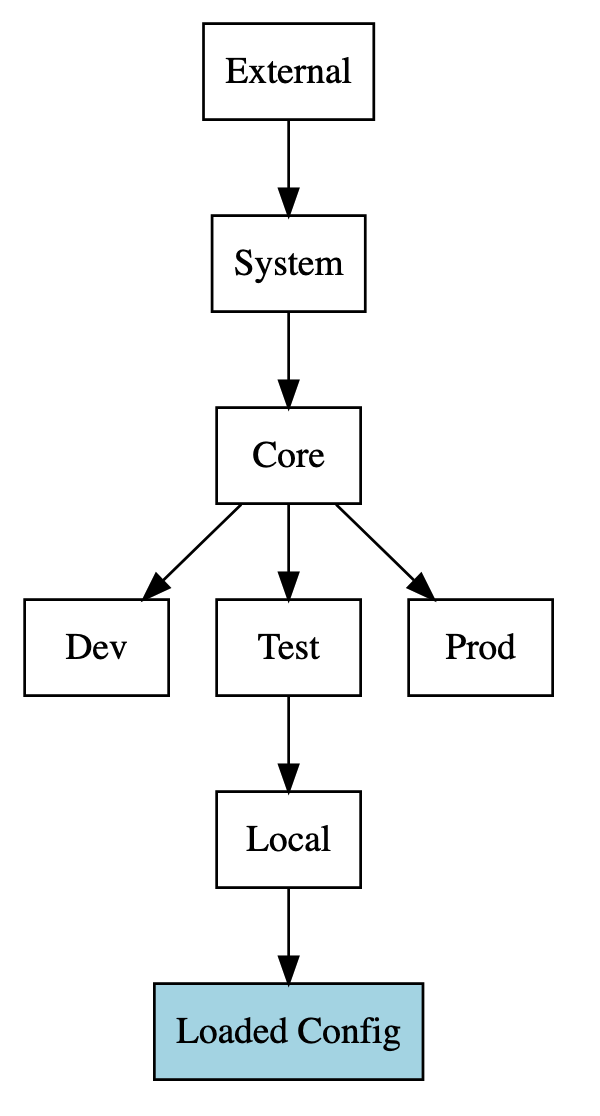 | No Deployment Mode 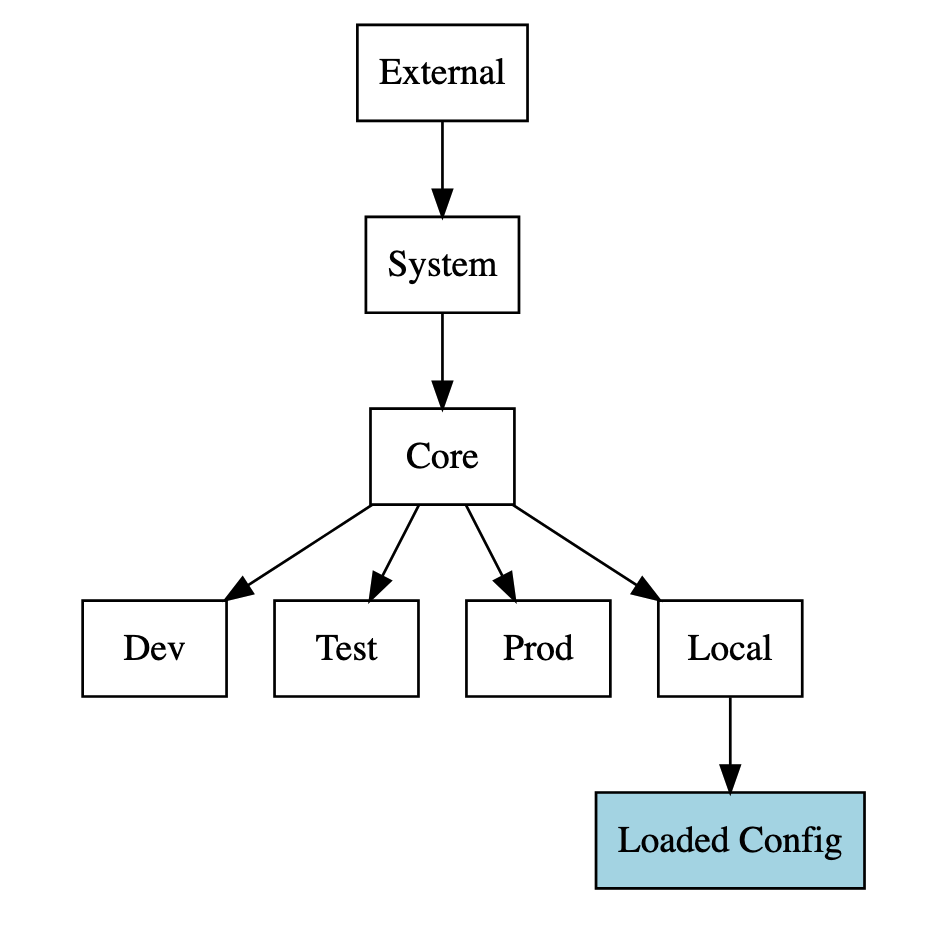 |
|---|
Singleton Resources
Singleton resources are one of two possible resource types for every system. These are nameless resources of which, as the name implies, there can only ever be one instance of. Singleton resources are appropriate for global configuration that applies to everything in your module.
Named Resources
Named resources are the other resource type that exist within an Ignition system. These are individual resources that must have a unique name, which is used to locate them. Unlike Ignition's project system where configuration resources can be nested into folder, all named resources exist at the root level.
Implementation
Resource Class
Generally, a single Java class will be defined that represents the in-memory state of a given resource. That Java class will usually be a record class, for convenience, but this is not a requirement. This class must contain only fields that can be read and written from a serialized state. Configuration resources are JSON serialized into a single config.json file, but you are able to choose a different serialization mechanism, store additional data in other files, or otherwise customize your resource storage if needed.
ResourceType
Every resource has an associated resource type, represented by the ResourceType class. ResourceType is a nominal tuple containing a module ID and a type ID, which is any arbitrary string you devise. By convention, this is a snake-case separated noun phrase. Therefore, named resources should use a singular form, such as database-driver instead of database-drivers. Singleton resources that represent multiple values can utilize plural forms, such as system-properties and general-alarm-settings. Since you'll be using it often, the resource type should be stored as a public static field that's accessible to the rest of your module. The resource type is then typically stored in the same class as the actual resource.
public static final ResourceType RESOURCE_TYPE = new ResourceType(MODULE_ID, "config-resource");
ResourceTypeMeta
Unique to Gateway-scoped configuration resources is the ResourceTypeMeta descriptor. This is a declarative manifest of metadata about a particular resource. Use ResourceTypeMeta.newBuilder to construct a new builder instance which you can customize further. At minimum you will need to provide a reference to your resource class, a reference to your resource type, and a human readable “category name” for your resource, as in:
public static final ResourceTypeMeta<MyConfigResource> META = ResourceTypeMeta.newBuilder(MyConfigResource.class)
    .resourceType(RESOURCE_TYPE)
    .categoryName("Custom Config Resource") // prefer .categoryNameKey to support i18n
    .build();
For convenience and performance, a constructed ResourceTypeMeta should be captured in a static final field in a common location - often, the same class used to define your resource itself. By itself, the ResourceTypeMeta does nothing. It must be provided to the Gateway’s ResourceTypeMetaRegistry, which is available from the GatewayContext that is delivered in your module’s setup hook:
  @Override
  public void setup(GatewayContext context) {
    context
        .getConfigurationManager()
        .getResourceTypeMetaRegistry()
        .register(MyConfigResource.TYPE_META);
  }
For more information about how to customize your resource’s behavior with other aspects of Ignition, including opting into (and out of) various enhancements, see the full ResourceTypeMeta page.
Resource Handlers
The SingletonResourceHandler and NamedResourceHandler base classes are also provided, respecting the resource types described above, to make working with instances of resources easier.
They can be used to automatically react to configuration changes from any source, load base configuration, and generally expedite boilerplate management. See the Resource Handlers page for more information.